ClearX + Exact Online Belgium
A clearer view of your Exact Online accounts.
Keep track of invoices, payments and projects in one focused portal. ClearX turns your Exact Online data into useful information for your everyday work.
For freelancers and small businesses using Exact Online Belgium.
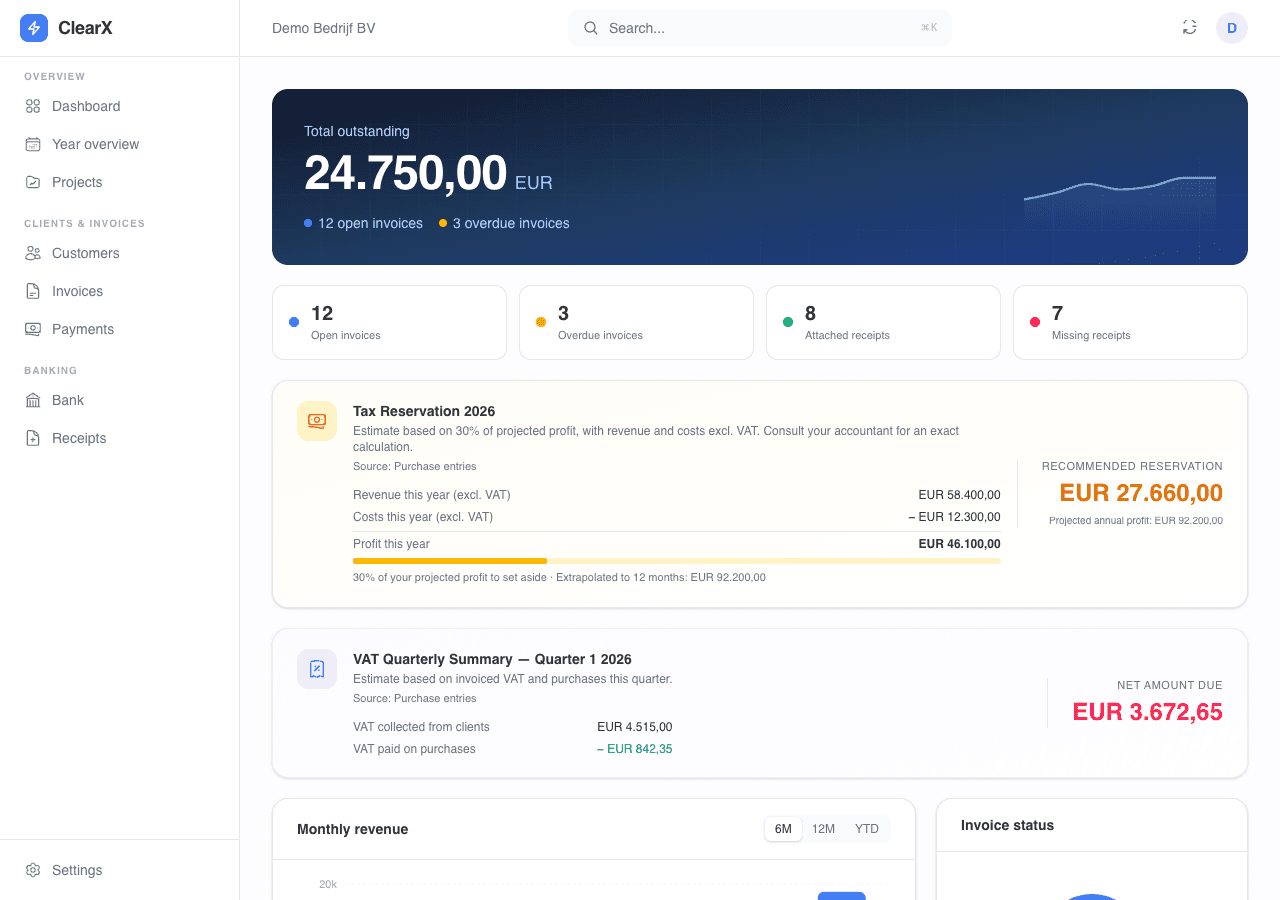
From records to insight.
Exact Online remains the foundation of your accounting. ClearX brings the information you use most often together in a focused workspace.
- Your figures at a glance
- View revenue, outstanding invoices, payments and cash flow. Use quarterly and annual summaries to track your figures and spot what needs attention.
- Customers and invoices
- View customers and sales invoices from Exact Online. Create customers and invoices in ClearX and keep track of invoice payment statuses.
- Receipts and bank transactions
- View bank transactions and link purchase documents to the corresponding transactions. Find out which expenses still need a supporting document.
- Projects and margins
- Bring sales invoices and supplier costs together by project reference. Add your plans, hours and hourly rate to compare revenue, costs and calculated project margins.
Connect and get started.
Sign in with Exact Online and authorise the ClearX integration. Your Exact password stays with Exact. ClearX uses the authorised connection to retrieve your records and carry out your actions.
What do you need?
An Exact Online account for Belgium with access to the administration and records you want to use. Your Exact subscription and user permissions must allow the required API access. ClearX runs in your browser, with nothing to install.
Need help with your first connection?Sign in with Exact Online
Choose to sign in with Exact Online in ClearX. Sign in on the Exact page and review the requested access before granting permission.
Check your administration
Have access to multiple administrations? Select the right one in Settings. Colleagues with their own Exact accounts can use the same projects when they have access to that same administration.
Load your records
Open your dashboard, invoices or bank overview. For project tracking, set the project start date and load the project records. You can then add plans and hours. The initial load may take longer when there are many records.
What does the integration exchange?
ClearX reads customers, sales invoices, payments, bank transactions and purchase records from the selected Exact administration. Available data depends on your Exact setup and access permissions.
Customers and invoices you create in ClearX are saved in Exact Online through the integration. ClearX stores additional project plans, settings and temporarily retrieved records to run the portal. These project plans are separate from your accounting entries in Exact.
Read how we handle your dataProject tracking in practice
Macovak · project integration
Macovak uses ClearX's project integration with Exact Online. Sales invoices and supplier costs are brought together by project reference in one overview.
ClearX shows revenue, costs and the calculated margin for each project. Plans, hours and hourly rates can be added in ClearX to include labour costs.
Pricing
See the current ClearX subscription and trial information in our pricing section.
View subscription and pricingYou also need your own Exact Online subscription. Questions about costs or whether your administration is suitable? Contact us.
Support from AP Studios
We can help with your first connection, selecting an administration and using ClearX. You can also contact us about missing data or a connection issue.
info@ap-studios.beFor an issue, include the screen, the time and what you were trying to do. Do not send passwords.
Ready to connect your accounts?
Get started with your own Exact Online account.